You did not start your business to spend your day chasing follow-ups.
You started it because you had a skill, a service, or a product that genuinely helps people. Maybe you run a busy dental clinic in Mumbai. Maybe you own a jewellery showroom in Dadar. Maybe you are a chartered accountant managing 150 clients, or a precision parts manufacturer in Pune exporting to three states. Whatever your business, the daily reality often looks the same: phone calls, WhatsApp messages, missed follow-ups, quotation requests lost in email threads, and lead details scribbled on notes. Your business gets busier every month - but somehow, it doesn't get bigger. This is not a strategy problem. This is an operations bottleneck, and it has a name: manual overload.
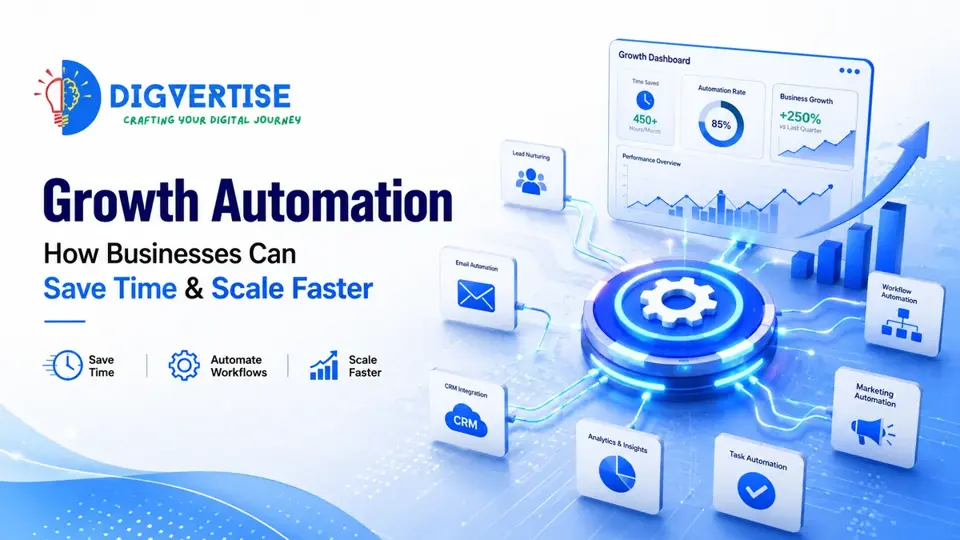
Growth automation is the process of replacing these repetitive, time-consuming tasks with simple, reliable systems that work for you around the clock. It is not about replacing your team with robotic scripts. It is about freeing your people to do the work that actually grows revenue: selling, advising, building relationships, and serving customers.
Many businesses assume they need more staff to grow. In reality, they often need better systems. When you put repetitive work on autopilot, you unlock a new level of efficiency that manual processes simply cannot match.
This guide explains what growth automation actually means for a growing business, introduces our signature frameworks, shows you where your business stands on the maturity scale, and gives you a practical checklist to start automating the right things first.
What Growth Automation Actually Means
Growth automation is not about writing complex software code or building futuristic systems. At its simplest, growth automation means this: when a potential customer shows interest in your business, the right actions happen immediately - without anyone having to copy, paste, forward, or follow up manually.
Why Manual Work Blocks Business Growth
Every business owner reaches a point where hiring more people doesn't speed things up. In fact, it often slows things down. When your business relies entirely on manual work, you hit a hard limit. You only have 24 hours in a day, and your team has only 8 hours in their shift.
If your sales executives spend three hours a day copying contact details from web forms, updating spreadsheets, and drafting individual confirmation emails, they are wasting human talent on machine work. That is three hours they are not spending on the phone closing deals. Manual work also introduces human errors. Leads are forgotten, phone numbers are copied incorrectly, and follow-ups are delayed. Growth rarely slows because of lack of demand. It usually slows because operations cannot keep up.
The Growth Automation Maturity Model™
Where does your business stand today? Under the Growth Automation Maturity Model™, businesses generally move through five distinct levels of automation maturity:
- Level 1 - Manual Business: Everything relies on manual effort. Leads are written on paper or copy-pasted. Follow-ups only happen when someone remembers. Reporting is non-existent or built from memory.
- Level 2 - Semi-Automated: You use separate digital tools like WhatsApp Business, a spreadsheet, and an email newsletter. However, these tools do not talk to each other. Your team still acts as the manual bridge between systems.
- Level 3 - Integrated: Your core tools are connected. When an enquiry comes through your website, it automatically syncs to your CRM. The system triggers a confirmation WhatsApp message and assigns the lead to a sales executive.
- Level 4 - AI-Assisted: The system uses smart routing to qualify leads. For instance, based on a prospect's answers on your website, it categorizes their intent and schedules a booking directly on the correct consultant's calendar.
- Level 5 - Predictive Business: The engine analyzes past customer data to predict conversion probabilities, automatically adjusts outreach frequencies, and alerts your team which deals have the highest probability of closing this week.
Many growing businesses we speak with sit somewhere between Level 2 and Level 3. Moving up one level at a time is usually a practical way to reduce manual effort while handling more customers.
Manual vs Automated Business: A Comparison
To understand the tangible impact of automation, let's compare how key business tasks are handled in a manual setup versus a growth-automated organization:
| Business area | Manual business | Growth-automated business |
|---|---|---|
| Lead response | Hours or days, depending on who sees the enquiry | An acknowledgement within minutes |
| Follow-up | Happens when someone remembers | Scheduled sequences with a human taking over |
| Customer experience | Delays and repeated questions | Clear confirmations and reminders |
| Reporting | Manual spreadsheets that drift out of date | Dashboards fed by the same records the team uses |
| Team time | Spent copying details between tools | Spent on conversations and delivery |
| Errors | Lost details, typos and missed leads | Fewer gaps because data is captured once |
| Growth | Usually needs more admin staff | Existing systems handle more volume |
The Digvertise Growth Automation Framework™
Based on our experience helping brands scale, the Digvertise Growth Automation Framework™ outlines a 7-stage path that any business can follow to automate their customer acquisition journey:
- 1. Capture: Every customer touchpoint - website forms, WhatsApp messages, phone calls, walk-in registrations - feeds into one central CRM system. This prevents lead data from getting lost in individual team inboxes.
- 2. Qualify: Not every enquiry is equal. The system automatically filters serious buyers from casual browsers based on quick questions (like budget range, timeline, or company size) before handing them to your sales representatives.
- 3. Engage: The qualified prospect receives an immediate response. For example, the system triggers a WhatsApp message containing a booking link to schedule a consultation at their convenience.
- 4. Automate: Repetitive workflows - booking confirmations, appointment reminders, invoice follow-ups, and review requests - run on auto-pilot without requiring manual intervention from your staff.
- 5. Measure: Every stage of the sales pipeline is tracked. You can see exactly how many enquiries came in, how fast your team responded, and which marketing channels delivered the highest value deals.
- 6. Optimize: Using real-time data, you refine your messaging templates, form fields, and response rules to improve conversion rates and customer satisfaction scores.
- 7. Scale: With a stable growth engine in place, you expand your reach - targeting new locations or launching new service lines - without having to proportionally increase your administrative head count.
Core Business Areas to Automate First
If you want to introduce automation to your business, do not try to change everything at once. Start with the areas that have the highest manual workload and the biggest impact on conversion:
- Speed-to-Lead Response: When a prospect fills out an enquiry form on your site, they are actively looking for a solution. If you take hours to respond, they have already reached out to competitors. Setting up an automated email or WhatsApp response containing a calendar link ensures you capture their interest when it is highest.
- Appointment and Booking Reminders: Clinics, salons, and consultancies can lose meaningful revenue to client no-shows. An automated reminder sequence - for example 24 hours and 2 hours before the appointment - can help reduce no-shows and keep the calendar fuller.
- Customer Review Collection: Google reviews directly influence your visibility in local search. Instead of manually asking every client for a review, configure your booking system to automatically trigger a review request SMS or WhatsApp link after service completion. You can learn more about how directory visibility builds trust in our Google Business Profile Optimization guide.
- Lead Nurturing Sequences: Not every visitor is ready to purchase today. Set up automated email or WhatsApp drip sequences that deliver value, case studies, and helpful tips to your leads over the next two weeks to build trust in the background.
Automation should never replace relationships. It should remove repetitive work so your team can spend more time with customers. Let the systems handle the routine, while your humans build the trust.
What Changes After Growth Automation?
When you replace manual admin pipelines with automated workflows, you see immediate, measurable improvements across your organization:
- Near-Instant Response Times: Leads get answered immediately, capturing buyers while their purchase intent is highest.
- Organized Customer Information: No more lost notes or sticky labels; CRM profiles show a prospect's entire history automatically.
- Fewer Manual Mistakes: Eliminates double bookings, lost follow-ups, typos, and forgotten review collection requests.
- Better Team Productivity: Repetitive copy-pasting is replaced, allowing your sales executives to spend their energy on active client consultations.
- Seamless Customer Experience: Automated reminders, confirmations, and follow-ups make your brand look professional and established.
Common Growth Automation Mistakes to Avoid
While automation is highly valuable, many business owners make critical mistakes that hurt customer relationships. Keep these key warnings in mind:
- Automating broken processes: If your manual sales sequence is confusing or ineffective, automating it will only produce bad results faster. Document and refine your process manually before you build the automation rules.
- Using too many disconnected tools: Connecting ten different tools using complex integrations creates multiple failure points. Focus on building a clean, unified stack centered around your core CRM and website.
- Losing the personal touch: Do not automate complex, high-value sales conversations. Use automation to qualify, and route, but let your real human experts handle the actual consulting and closing.
- Ignoring input validation: If your web forms accept fake phone numbers or invalid emails, your CRM will fill up with garbage data. Use real-time validation to ensure lead quality.
Illustrative Example
Illustrative Example - not a real client
Consider a precision manufacturing company in Pune that supplies metal parts to automotive firms. The owner was spending several hours every week manually sorting quotation requests from their website, routing the details to different engineering managers based on the part type, and following up on pending quotes via email.
Because the process was manual, request details were frequently lost in cluttered inboxes, and quotation response times were delayed. Prospective clients frequently chose other suppliers who provided quotes faster.
After implementing a structured growth automation system, the manufacturer's workflow changed completely. Now, when a drawing file is uploaded to their enquiry form, the system automatically runs validation checks, logs the lead details in a centralized database, and assigns the task to the correct manager with an automatic deadline. The system also triggers a professional WhatsApp confirmation to the prospect with an estimated quotation timeline.
In a setup like this, quotation responses can move from days to within a working day, and the team can win back several hours a week for production and client relationships. The exact gain depends on volume and how well the process was mapped first.
Actionable Growth Automation Checklist
- ✓Use this checklist to audit and automate your growth pipeline:
- ✓Map your customer journey from initial discovery to closing.
- ✓Identify the top three repetitive, manual tasks your team performs daily.
- ✓Establish a single source of truth (CRM) for all customer data.
- ✓Set up real-time validation on all website enquiry forms.
- ✓Build an immediate automated email/WhatsApp response for new leads.
- ✓Connect booking calendars to automate appointment scheduling.
- ✓Configure automated reminder sequences to reduce calendar no-shows.
- ✓Build an automated review request loop post-service delivery.
- ✓Monitor error logs and lead routing weekly to prevent leaks.
Conclusion
Scaling your business is not about working more hours. It is about building scalable systems. Growth automation eliminates manual data entry, shortens response times, coordinates lead nurturing, and establishes a single source of truth for your growth metrics. By putting repetitive admin tasks on autopilot, you can secure more enquiries and scale your business without growing your administrative workload.