
You search for your own business on Google Maps and it is not there. Or it appears when you type its name, but not when customers search for what you sell. Both are common, and both usually have a cause you can fix.
This guide goes through nine common reasons in the order we check them, with what Google’s own help pages say about each.
First, check what “not showing” means
- Not found even by name: search your exact business name and area. If nothing appears, the problem is the profile itself: missing, unverified, suspended or duplicated. Reasons 1 to 5 apply.
- Found by name, but not for your service: if your name finds you but “dentist near me” or “bakery in your area” does not, the profile exists but is not ranking. Reasons 6 to 9 apply.
Search on a phone, signed out or in a private window, from where your customers are. Results change with location, so a search from your own office is not a fair test.
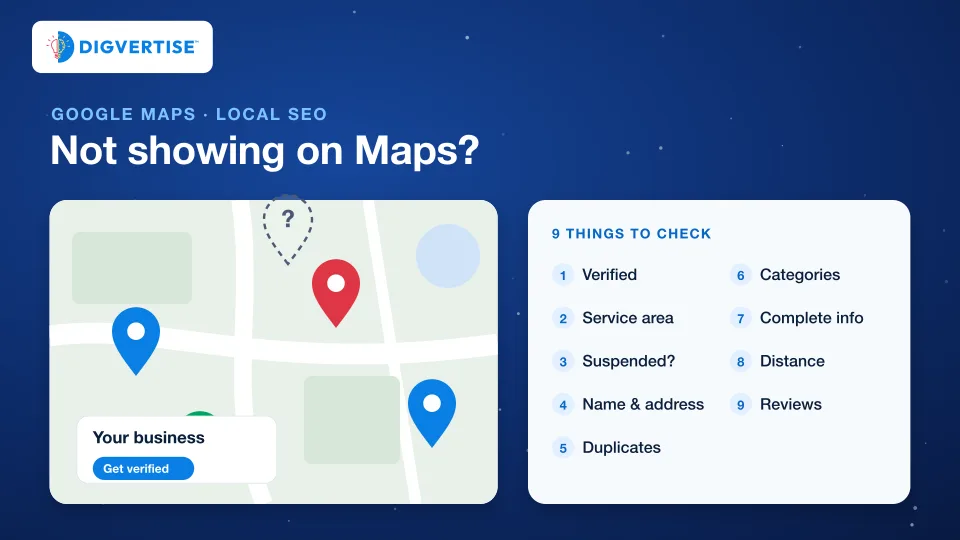
| Reason | Typical sign | First thing to do |
|---|---|---|
| 1. Not verified | Profile shows “Get verified” | Finish verification and wait for the review |
| 2. Service area set up wrongly | No street address shown | Check the service areas match where you work |
| 3. Suspended or disabled | Notice in your profile | Fix the issue, then appeal once |
| 4. Name or address breaks guidelines | Keywords in the name, virtual office | Use the real-world name and address |
| 5. Duplicate profiles | Two listings for one business | Keep one and resolve the duplicate |
| 6. Wrong categories | Found by name only | Choose the few categories that describe your core business |
| 7. Incomplete information | Missing hours, services, photos | Complete and correct every section |
| 8. Searcher too far away | Visible nearby, not across town | Keep the address accurate; use your website for wider areas |
| 9. Others are better known | Competitors with more reviews rank above you | Earn genuine reviews and mentions |
1. The profile is not verified yet
Google explains that verifying tells it you are authorised to represent the business, which makes the profile more likely to show up in search results. The verification methods offered, such as phone or text, email, a video recording, a live video call or mail, are chosen by Google and depend on your business. After you complete the steps, Google says reviews take up to 5 business days, and occasionally longer.
What to do: finish verification with the method offered, and do not create a second profile while you wait. If the “Get verified” button returns later, Google’s verification page explains how to fix the issue or verify again.
2. You serve customers at their location and the service area is wrong
Plumbers, home tutors, pest control and other businesses that travel to customers are service-area businesses. Google’s guidelines say they should have one profile for the central office or location, with a designated service area. If you do not receive customers at your address, the profile should show your service area, not a street address.
What to do: check that the service areas you set are the places you actually serve, and that you are not listing a home address customers cannot visit.
3. The profile is suspended or disabled
Google may suspend or disable profiles that do not follow its guidelines. The owner or a manager can ask for reinstatement through Google’s appeal process.
What to do: read the notice in your profile, fix the cause first (often the name, the address or a duplicate), then submit one appeal with evidence such as photos of your signboard and documents if asked. Several appeals at once rarely help.
4. The name or address breaks Google’s guidelines
Google asks for your business name as it appears in the real world: on your signboard, website and stationery. Adding keywords or your city to the name is not allowed. For the address, Google says P.O. boxes or mailboxes at remote locations are not acceptable, and a rented mailing address where the business does not operate, often called a virtual office, is not eligible. An office at a co-working space qualifies only with clear signage, staff present and customers received there during business hours.
What to do: use your real name and real location. If your signboard name differs from your registered name, use the one customers know.
5. There are two profiles for one business
Google’s guidelines say there should be only one profile per business, because duplicates cause problems with how information displays on Maps and Search. Duplicates often appear when a past employee or agency created a profile, or when a new one was made after losing access to the old one.
What to do: search for every version of your name and old phone numbers. Keep the verified profile and use Google’s help centre to resolve the duplicate or request ownership of the old one.
6. The categories do not match what people search
Google ranks local results mainly on relevance, distance and prominence. Relevance is how well a profile matches what someone searches for. Google’s guidelines also ask you to choose the fewest categories it takes to describe your core business.
What to do: pick the primary category that describes your main service in the words customers use, such as “Dental clinic” rather than a broad “Health”, and add only the secondary categories that are genuinely true.
7. Information is incomplete or out of date
Google says businesses with complete and accurate information are more likely to show up in local results, and that inaccurate information may stop a profile from showing for relevant searches.
What to do: complete every section: hours and special hours, phone, website, services or products, attributes, a clear description and recent photos. Our guide to Google Business Profile optimization goes section by section.
8. The searcher is too far away
Distance is one of the three factors. If a customer does not share their location, Google uses what it knows about it. You cannot change distance, but you can make sure your address or service area is accurate.
What to do: accept that a profile mostly wins nearby searches. For customers further away, your website’s service and location pages, and ads if they suit you, do that work.
9. Others nearby are better known
Prominence is how well known a business is. Google says it draws on information such as links to your business from other websites and how many reviews you have, and that more reviews and positive ratings can help local ranking. Google also states there is no way to request or pay for a better local ranking.
What to do: ask every satisfied customer for a review with a short link or QR code, reply to reviews, and get listed where your business genuinely belongs, such as trade associations and local directories. Our guide to reviews and local growth shows a simple routine.
What not to do
- Do not buy reviews or post them yourself. It breaks trust and can lead to removal.
- Do not stuff keywords into the business name.
- Do not create extra profiles for the same location.
- Do not use a virtual office or someone else’s address.
- Do not pay anyone who guarantees a top position on Maps.
When to get help
If the profile is verified, accurate and still invisible for your main service after a few weeks, compare it with the three businesses that rank above you: categories, reviews, photos and how complete each section is. The gap is usually visible. If the profile is suspended and an appeal has failed, get help from someone who has handled reinstatements before you change anything else.